# How to create Visual Studio Multi Projects .Net Solution Template and deploy Nuget Package?
# How to create Visual Studio Multi Projects .Net Solution Template and deploy Nuget Package?
# Create Sample Project
To begin with, we create our sample project by going to the folder where we keep our repositories. I am using [dotnet CLI](https://docs.microsoft.com/tr-tr/dotnet/core/tools/) with powershell in Windows 10 but you can use different terminals and OS (MACOS, Linux etc.)
```
PS> mkdir Matech.Sample.Template
PS> cd Matech.Sample.Template
```
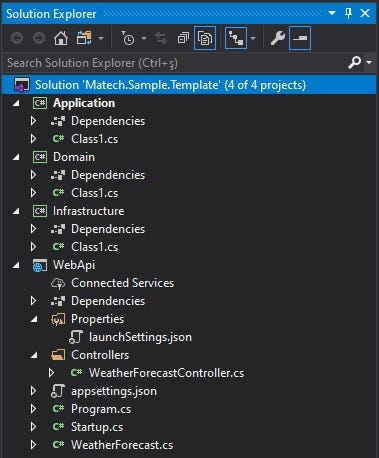
Add some class library projects (Application, Domain, Infrastructure) and Web Api project.
```
PS Matech.Sample.Template> dotnet new classlib -n Application
PS Matech.Sample.Template> dotnet new classlib -n Domain
PS Matech.Sample.Template> dotnet new classlib -n Infrastructure
PS Matech.Sample.Template> dotnet new webapi -n WebApi
```
Add Solution item
```
PS Matech.Sample.Template> dotnet new sln
```
Add multiple C# projects to a solution `Matech.Sample.Template.sln` using a globbing pattern (Windows PowerShell only):
```
PS Matech.Sample.Template> dotnet sln Matech.Sample.Template.sln add (ls -r **/*.csproj)
```
Add multiple C# projects to a solution using a globbing pattern (Unix/Linux only):
```
PS Matech.Sample.Template> dotnet sln Matech.Sample.Template.sln add **/*.csproj
```
You can check [dotnet sln](https://docs.microsoft.com/tr-tr/dotnet/core/tools/dotnet-sln).
# Matech.Sample.Template Project
Let’s go to the folder where we created our project and add new classes to our project.
`Domain` will contain all entities, enums, exceptions, interfaces, types and logic specific to the domain layer. If you are interested in Clean Architecture, you can check my public open source [solution template for creating a ASP.NET Core Web Api following the principles of Clean Architecture](https://github.com/iayti/CleanArchitecture).
`Infrastructure` layer contains classes for accessing external resources such as file systems, web services, smtp, and so on. These classes should be based on interfaces defined within the application layer.
# Prerequisites for Database Migrations
* If you don’t have [Entity Framework Core tools reference — .NET Core CLI](https://docs.microsoft.com/tr-tr/ef/core/miscellaneous/cli/dotnet), Install
```
PS Matech.Sample.Template> dotnet tool install --global dotnet-ef
```
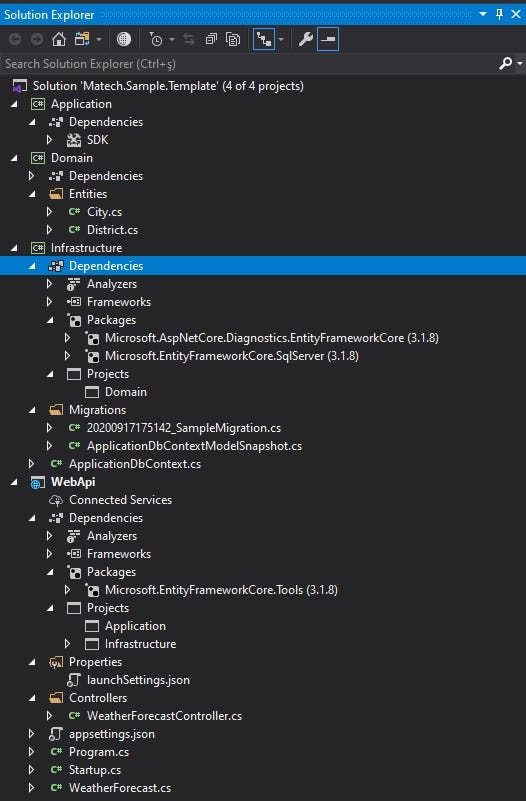
Add Domain reference to Infrastructure project.
Add Application and Infrastructure reference to WebApi project.
Dependencies
* Infrastructure
* Microsoft.EntityFrameworkCore.SqlServer
* Microsoft.AspNetCore.Diagnostics.EntityFrameworkCore
* WebApi
* Microsoft.EntityFrameworkCore.Tools
Add initial create for database.
* `--project Infrastructure` (optional if in this folder)
* `--startup-project WebApi`
* `--output-dir Migrations`
```
PS Matech.Sample.Template> dotnet ef migrations add --project Infrastructure --startup-project WebApi --output-dir Migrations
```
Sample template project is finally ready 😄
# Adding .template.config and testing locally.
The example below demonstrates the file and folder structure of using a template.json to create a template pack. Check the [microsoft docs](https://docs.microsoft.com/en-us/dotnet/core/tools/custom-templates).
```
Matech.Sample.Template
|___.template.config
|___template.json
|___Application
|___Domain
|___Infrastructure
|___WebApi
|___Matech.Sample.Template.sln
```
Configure your `template.json` and that's it 😄.
Let’s try our template locally.
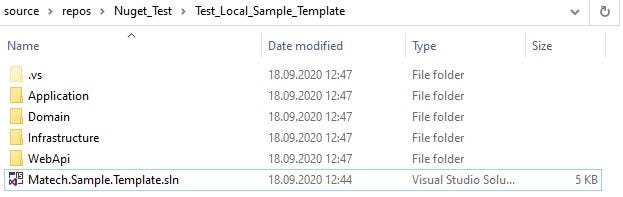
Create a new project using our local template.
```
PS> mkdir Test_Local_Sample_Template
PS> cd Test_Local_Sample_Template
PS Test_Local_Sample_Template> dotnet new mst
```
Project was created 😄
Check the project and if anything is wrong, change the settings you made and install template locally for testing again.
Uninstall Template
```
PS> dotnet new --uninstall
PS> dotnet new -u \Matech.Sample.Template
```
# Configure Nuget Deployment
First you need to create an account on [nuget.org](https://www.nuget.org/) like my profile [ilkerayti](https://www.nuget.org/profiles/ilkerayti).
# Download Nuget.exe and add to Path
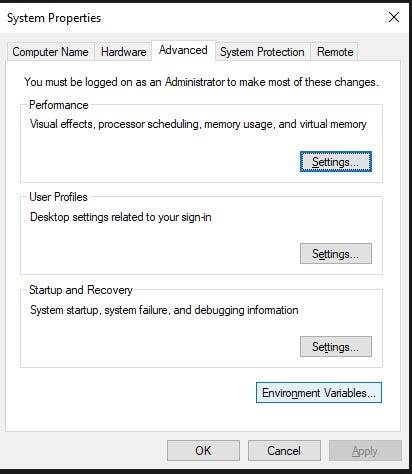
Actually you don’t need to add path Nuget.exe but it is a very useful usage. [Download Nuget’s latest version.](https://www.nuget.org/downloads) Windows 10 search: Edit the system environment variables.
Go to Environment Variables
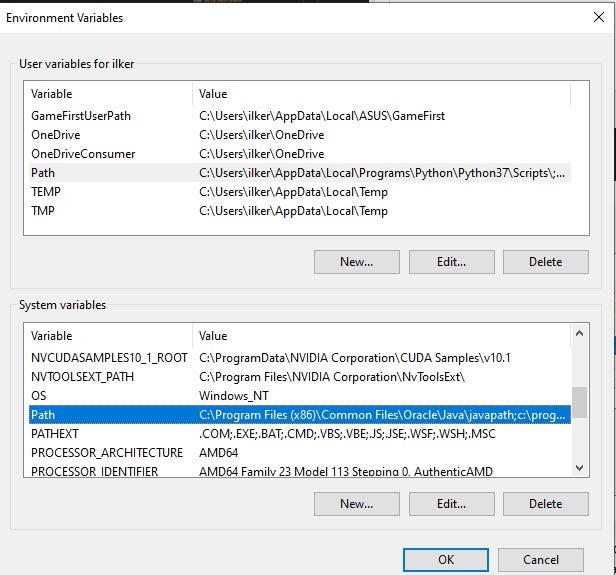
Go to System variables Path with double click.
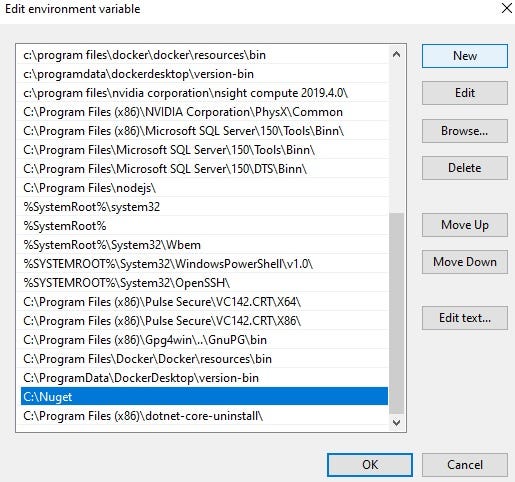
Add New nuget.exe file location in your system.
# Configure .nuspec file
Open terminal in your Matech.Sample.Template project folder
```
PS Matech.Sample.Template> nuget spec
```
Package.nuspec file must be created in your project folder.
After the configuration, we finally created a .nupkd file for nuget.org upload or push.
```
PS Matech.Sample.Template> nuget pack Package.nuspec -NoDefaultExcludes
```
If you don’t add nuget.exe to Environment System Variable Path just use the nuget.exe
```
PS Matech.Sample.Template> C:\Nuget\nuget.exe pack Package.nuspec -NoDefaultExcludes
```
Package was created.
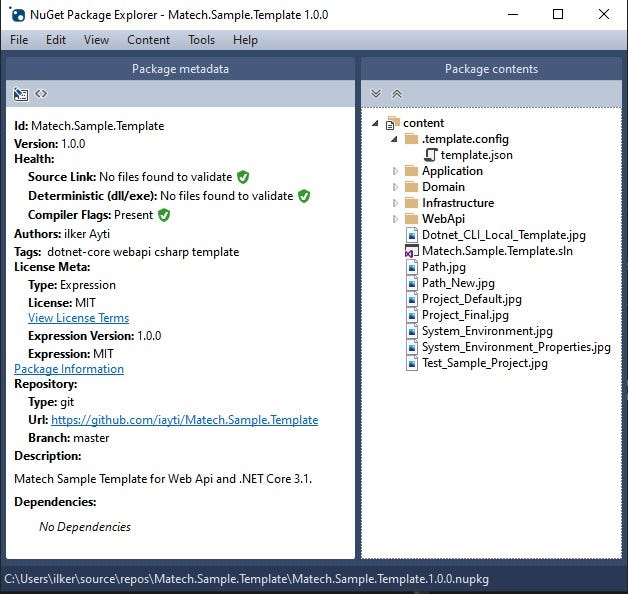
[Nuget Package Explorer](https://www.microsoft.com/en-us/p/nuget-package-explorer/9wzdncrdmdm3) is very useful tool for checking .nupkd file before publish.
Finally we can upload to packages to Nuget servers 😄
Upload Package
Check [Matech.Sample.Template](https://www.nuget.org/packages/Matech.Sample.Template)
# Sample Template Usage
Open terminal in your repos folder.
```
PS> mkdir Your.Template.Name
PS> cd Your.Template.Name
```
Template will use your folder name as project name
```
PS Your.Template.Name> dotnet new --install Matech.Sample.Template PS Your.Template.Name> dotnet new mst
```
# Support
If you are having problems, please let us know by [raising a new issue](https://github.com/iayti/Matech.Sample.Template/issues/new).
# License
This project is licensed with the [MIT license](https://github.com/iayti/Matech.Sample.Template/blob/master/LICENSE).
_Originally published at_ [_https://github.com/_iayti/Matech.Sample.Template](https://github.com/iayti/Matech.Sample.Template)_._
 Let’s go to t
 # Adding .template.config and testing locally.
The example below demonstrates the file and folder structure of using a template.json to create a template pack. Check the [microsoft docs](https://docs.microsoft.com/en-us/dotnet/core/tools/custom-templates).
```
Matech.Sample.Template
|___.template.config
|___template.json
|___Application
|___Domain
|___Infrastructure
|___WebApi
|___Matech.Sample.Template.sln
```
Configure your `template.json` and that's it 😄.
Let’s try our template locally.
# Adding .template.config and testing locally.
The example below demonstrates the file and folder structure of using a template.json to create a template pack. Check the [microsoft docs](https://docs.microsoft.com/en-us/dotnet/core/tools/custom-templates).
```
Matech.Sample.Template
|___.template.config
|___template.json
|___Application
|___Domain
|___Infrastructure
|___WebApi
|___Matech.Sample.Template.sln
```
Configure your `template.json` and that's it 😄.
Let’s try our template locally.
 Create a new project using our local template.
```
PS> mkdir Test_Local_Sample_Template
PS> cd Test_Local_Sample_Template
PS Test_Local_Sample_Template> dotnet new mst
```
Project was created 😄
Create a new project using our local template.
```
PS> mkdir Test_Local_Sample_Template
PS> cd Test_Local_Sample_Template
PS Test_Local_Sample_Template> dotnet new mst
```
Project was created 😄
 Check the project and if anything is wrong, change the settings you made and install template locally for testing again.
Uninstall Template
```
PS> dotnet new --uninstall
PS> dotnet new -u
Check the project and if anything is wrong, change the settings you made and install template locally for testing again.
Uninstall Template
```
PS> dotnet new --uninstall
PS> dotnet new -u 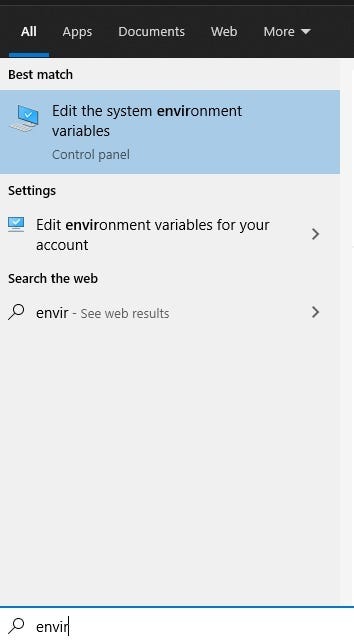 Go to Environment Variables
 Go to System variables Path with double click.
 Add New nuget.exe file location in your system.
 # Configure .nuspec file
Open terminal in your Matech.Sample.Template project folder
```
PS Matech.Sample.Template> nuget spec
```
Package.nuspec file must be created in your project folder.
After the configuration, we finally created a .nupkd file for nuget.org upload or push.
```
PS Matech.Sample.Template> nuget pack Package.nuspec -NoDefaultExcludes
```
If you don’t add nuget.exe to Environment System Variable Path just use the nuget.exe
```
PS Matech.Sample.Template> C:\Nuget\nuget.exe pack Package.nuspec -NoDefaultExcludes
```
Package was created.
# Configure .nuspec file
Open terminal in your Matech.Sample.Template project folder
```
PS Matech.Sample.Template> nuget spec
```
Package.nuspec file must be created in your project folder.
After the configuration, we finally created a .nupkd file for nuget.org upload or push.
```
PS Matech.Sample.Template> nuget pack Package.nuspec -NoDefaultExcludes
```
If you don’t add nuget.exe to Environment System Variable Path just use the nuget.exe
```
PS Matech.Sample.Template> C:\Nuget\nuget.exe pack Package.nuspec -NoDefaultExcludes
```
Package was created.
 [Nuget Package Explorer](https://www.microsoft.com/en-us/p/nuget-package-explorer/9wzdncrdmdm3) is very useful tool for checking .nupkd file before publish.
 Finally we can upload to packages to Nuget servers 😄
Upload Package
Finally we can upload to packages to Nuget servers 😄
Upload Package


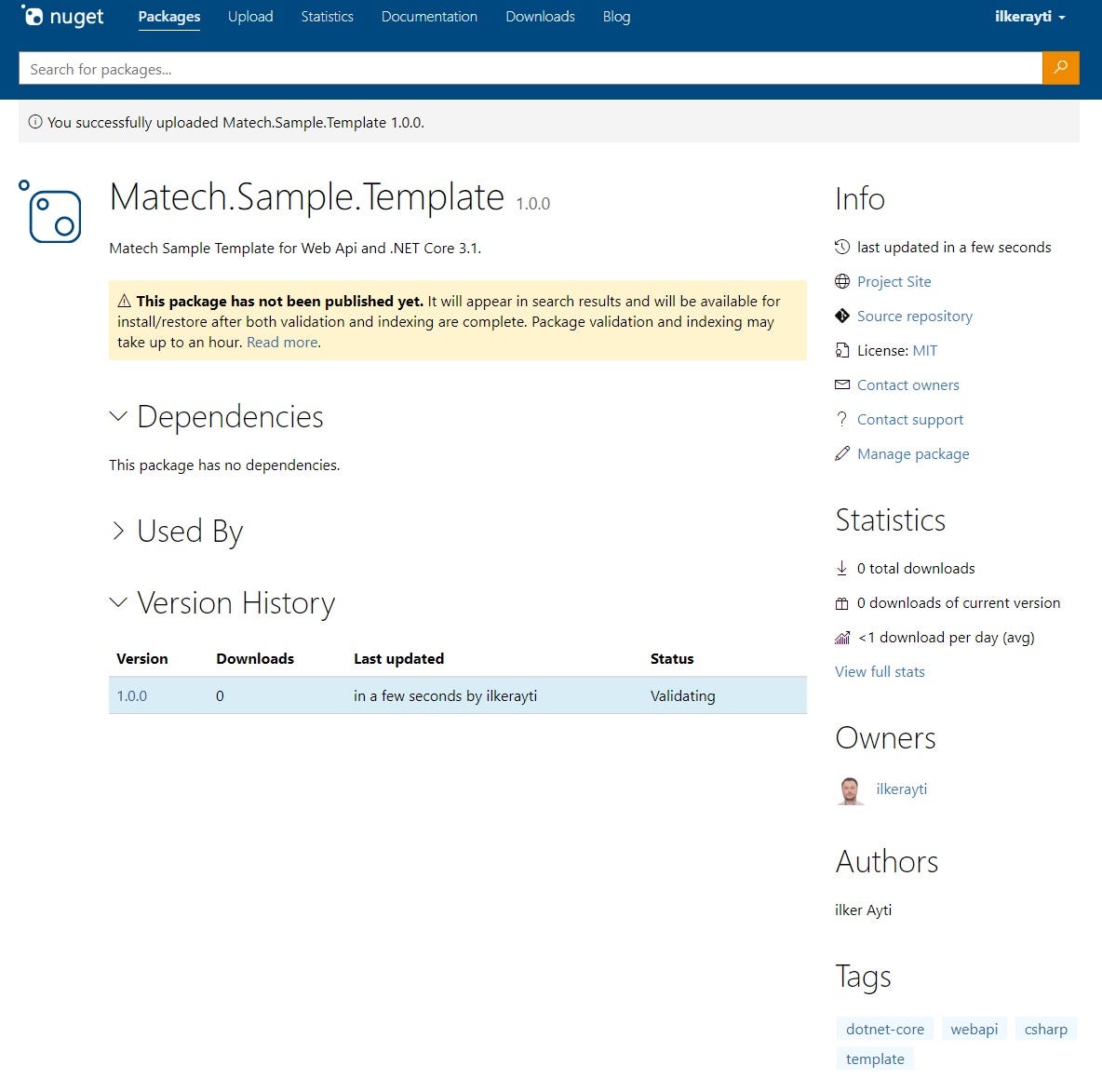 Check [Matech.Sample.Template](https://www.nuget.org/packages/Matech.Sample.Template)
# Sample Template Usage
Open terminal in your repos folder.
```
PS> mkdir Your.Template.Name
PS> cd Your.Template.Name
```
Template will use your folder name as project name
```
PS Your.Template.Name> dotnet new --install Matech.Sample.Template PS Your.Template.Name> dotnet new mst
```
# Support
If you are having problems, please let us know by [raising a new issue](https://github.com/iayti/Matech.Sample.Template/issues/new).
# License
This project is licensed with the [MIT license](https://github.com/iayti/Matech.Sample.Template/blob/master/LICENSE).
_Originally published at_ [_https://github.com/_iayti/Matech.Sample.Template](https://github.com/iayti/Matech.Sample.Template)_._
Check [Matech.Sample.Template](https://www.nuget.org/packages/Matech.Sample.Template)
# Sample Template Usage
Open terminal in your repos folder.
```
PS> mkdir Your.Template.Name
PS> cd Your.Template.Name
```
Template will use your folder name as project name
```
PS Your.Template.Name> dotnet new --install Matech.Sample.Template PS Your.Template.Name> dotnet new mst
```
# Support
If you are having problems, please let us know by [raising a new issue](https://github.com/iayti/Matech.Sample.Template/issues/new).
# License
This project is licensed with the [MIT license](https://github.com/iayti/Matech.Sample.Template/blob/master/LICENSE).
_Originally published at_ [_https://github.com/_iayti/Matech.Sample.Template](https://github.com/iayti/Matech.Sample.Template)_._